4K GPS Dash Cam: Night Vision, Voice Control & Tips
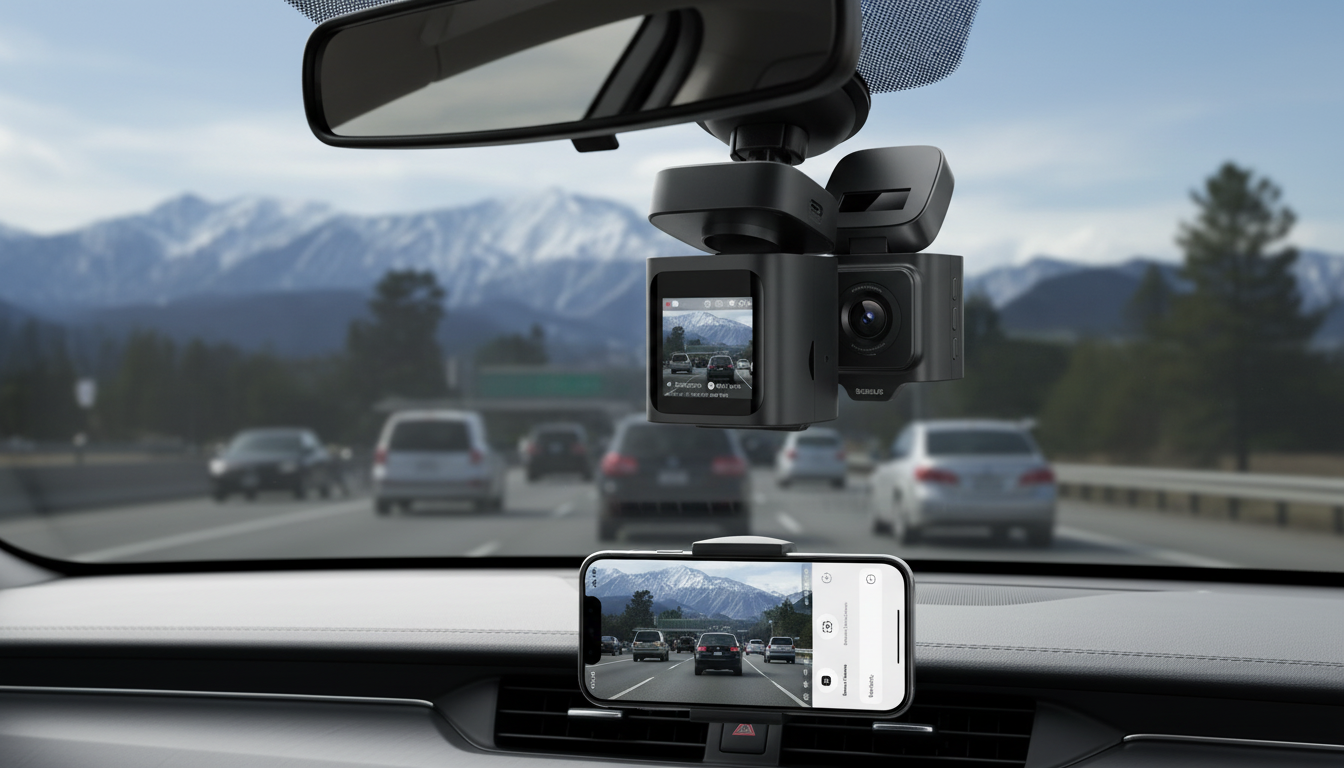
4K Ultra HD GPS Dash Cam with Night Vision and Voice Control
Clear footage, reliable location data, and hands-free controls can make a dash cam more useful day to day—especially during night driving and long commutes. This 4K Ultra HD model combines high-resolution recording with GPS tracking, enhanced low-light capture, and voice control for easier operation while keeping attention on the road.
If you’re upgrading from a basic camera (or adding protection to a new vehicle), the 4K Ultra HD GPS Dash Cam with Night Vision and Voice Control is built to capture the kinds of details drivers actually want when reviewing a close call: lane markings, signage, surrounding vehicles, and the context of where you were and how fast you were moving.
What this dash cam is designed to do
- Record detailed 4K video that helps capture road signs, lane markings, and vehicle details
- Log driving routes and speed data through GPS for better context during playback
- Improve nighttime capture so footage remains usable after dark
- Enable hands-free operation via voice control for common actions
- Support everyday protection features like continuous recording and incident capture (depending on settings and memory card)
It’s a practical fit for commuters, rideshare drivers, and road-trippers who want high-resolution clips plus data-backed playback—without needing to tap buttons mid-drive.
Key features at a glance
Some dash cams emphasize resolution but skip usability features. Others are easy to operate but don’t capture enough detail when lighting gets tricky. This model aims to balance both.
Feature-to-benefit checklist
| Feature | Why it matters in real driving |
|---|---|
| 4K Ultra HD video | More readable details like signs, markings, and vehicles in the frame |
| GPS logging | Adds context to clips with route and speed data during playback |
| Night vision | Helps maintain clarity when streets are dim or headlights create glare |
| Voice control | Reduces need to reach for buttons while driving |
| Continuous/loop recording (with compatible card) | Keeps recording without manual file management by overwriting the oldest clips |
4K video quality: what to expect on the road
Higher resolution helps most when something happens quickly—an abrupt merge, a sudden stop, or a confusing intersection—because the usable information is often contained in a small part of the frame. 4K footage gives more room for detail without relying on aggressive zoom that can blur or pixelate.
- Sharper footage can make it easier to identify events and driving conditions, especially when reviewing quick moments like merges or sudden stops.
- Best results come from a clean windshield, correct camera angle, and minimizing reflections on the dashboard.
- Consider how lighting changes affect clarity: midday glare, dusk transitions, and nighttime headlight flare.
For the clearest daytime results, mount the camera so the horizon sits roughly in the upper third of the frame. Too much sky can reduce the visible detail of the roadway; too much hood can limit what you see ahead.
Night vision and low-light capture
Night driving is where many dash cams struggle: streetlights are inconsistent, headlights introduce flare, and raindrops can create a shimmering haze. Night-optimized capture helps footage stay more readable in dim scenes, particularly when you’re driving on poorly lit roads or dealing with mixed lighting (streetlights plus oncoming traffic).
- Night-focused processing is most helpful on poorly lit roads, in rain, and in mixed lighting (streetlights plus headlights).
- Placement matters: mounting too low can increase glare from dashboard reflections; too high can reduce visibility of near-field details.
- For best nighttime results, keep interior lights off and avoid reflective items on the dash.
A small change—like lowering dashboard brightness or removing reflective decorations—can noticeably reduce windshield glare and improve what the camera can “see.”
GPS: turning video into a complete driving record
Video shows what happened; GPS can help explain where and when it happened, plus provide speed context that’s useful during review. For long commutes or road trips, route data can also help you quickly locate the right clip without scrubbing through a full day of recordings.
- GPS can add route and speed context that helps explain what happened before, during, and after an event.
- Playback tools often allow reviewing clips alongside map data when GPS data is embedded or paired.
- If GPS accuracy seems off, allow time for signal lock and avoid blocking placement (some windshields or tints can affect reception).
Voice control: safer interaction while driving
Safe operation matters. For guidance on reducing driver distraction, see NHTSA — Distracted Driving.
Installation, power, and daily use
Storage and file management tips
Privacy, local rules, and responsible recording
For general consumer guidance related to vehicles and purchases, visit Federal Trade Commission — Consumer Advice (Cars).
Who this model fits best
For a feature-forward setup that’s easy to live with, start with the 4K Ultra HD GPS Dash Cam with Night Vision and Voice Control and dial in positioning and settings for your typical routes.
Related add-ons for a cleaner cabin
For a minimal, vent-based option, take a look at the Crystal Moon & Star Car Vent Clips.
FAQ
Does GPS record speed and location on every clip?
GPS typically records speed and location once the dash cam has a solid signal lock. How that information appears (overlay, metadata, or map playback) depends on the camera’s playback method or companion app, and accuracy can vary with signal conditions.
How does night vision help compared with standard recording?
Night vision-focused processing is designed to improve visibility in dim scenes by reducing noise and handling harsh contrast from headlights and streetlights. Results are best with a clean windshield, minimal interior reflections, and realistic expectations in heavy rain or glare.
What memory card type works best for continuous recording?
A compatible high-endurance microSD card is best for continuous loop recording because it’s built for frequent overwriting. Choose a capacity that matches how many hours you want to retain, and periodically format the card and back up important clips.















Leave a comment